 在线客服
在线客服



C#.Net用户自定义控件制作教程
.Net用户自定义控件继承UserControl类,设计很简单的,像平时在窗体上拖控件一样。
下面跟着我一步步做:
1. 建立一个工程,添加用户控件。
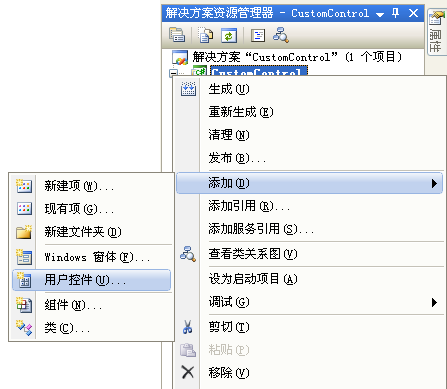
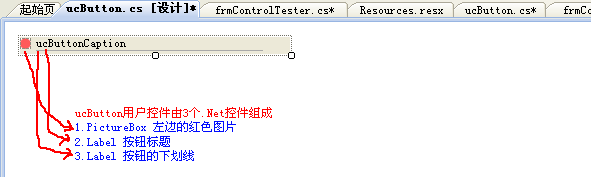
2.在打开的窗体内输入控件名称,如:"ucButton",按确定按钮。接下来在空白区域拖放3个.Net控件。
如下图:
3.编码
/// <summary>
/// C#.Net 设计用户自定义控件
/// C#制作用户自定义控件
/// </summary>
/// </summary>
[ToolboxBitmap(typeof(CustomControl.ucButton), "ucButton.bmp")]
public partial class ucButton : UserControl
{
private bool _IsFocused = false; //标记按钮是否为焦点状态
public ucButton()
{
InitializeComponent();
this.DoHideFocusedTag();
this.MyCatpionText = this.Name;
}
private EventHandler _OnButtonClick = null;
private string _MyCatpionText = "ucButton1";
/// <summary>
/// 按钮标题
/// </summary>
[EditorBrowsable(EditorBrowsableState.Always)]
[Browsable(true)]
[DefaultValue("ucButton1")]
public string MyCatpionText
{
get { return _MyCatpionText; }
set { _MyCatpionText = value; lblCaption.Text = _MyCatpionText; }
}
/// <summary>
/// 用户自定义Click事件
/// </summary>
[EditorBrowsable(EditorBrowsableState.Always)]
[Browsable(true)]
public event EventHandler OnButtonClick
{
add { _OnButtonClick += new EventHandler(value); }
remove { _OnButtonClick -= new EventHandler(value); }
}
private void lblCaption_Click(object sender, EventArgs e)
{
//转移Click事件, 触发用户自定义事件
if (_OnButtonClick != null) _OnButtonClick(this, e);
}
private void lblCaption_MouseDown(object sender, MouseEventArgs e)
{
if (_IsFocused)
{
lblCaption.Font = new Font(lblCaption.Font.FontFamily, lblCaption.Font.Size, FontStyle.Bold);
}
}
private void lblCaption_MouseUp(object sender, MouseEventArgs e)
{
if (_IsFocused)
{
lblCaption.Font = new Font(lblCaption.Font.FontFamily, lblCaption.Font.Size, FontStyle.Regular);
}
}
private void ucButton_SizeChanged(object sender, EventArgs e)
{
lblUnderLine.Top = this.Height - 1;
lblUnderLine.Width = this.Width - 15;
}
/// <summary>
/// 还原按钮状态
/// </summary>
public void DoHideFocusedTag()
{
this.pictureBox1.Image = global::vjsdn.CustomControl.Properties.Resources.GrayTag;
this.lblUnderLine.Visible = false;
lblCaption.ForeColor = Color.Black;
}
/// <summary>
/// 设计按钮为焦点状态
/// </summary>
public void DoShowFocusedTag()
{
this.pictureBox1.Image = global::vjsdn.CustomControl.Properties.Resources.FosedTag;
this.lblUnderLine.Visible = true;
lblCaption.ForeColor = Color.Blue;
}
private void ucButton_MouseEnter(object sender, EventArgs e)
{
if (this.Parent != null)
{
foreach (Control c in this.Parent.Controls)
{
if (c is ucButton) (c as ucButton).DoHideFocusedTag();
}
}
this.DoShowFocusedTag();
_IsFocused = true;
}
[EditorBrowsable(EditorBrowsableState.Always)]
[Browsable(true)]
[Description("")]
public Label MyCaption
{
get { return lblCaption; }
}
private void lblCaption_MouseEnter(object sender, EventArgs e)
{
this.ucButton_MouseEnter(sender, e);
}
}
/// C#.Net 设计用户自定义控件
/// C#制作用户自定义控件
/// </summary>
/// </summary>
[ToolboxBitmap(typeof(CustomControl.ucButton), "ucButton.bmp")]
public partial class ucButton : UserControl
{
private bool _IsFocused = false; //标记按钮是否为焦点状态
public ucButton()
{
InitializeComponent();
this.DoHideFocusedTag();
this.MyCatpionText = this.Name;
}
private EventHandler _OnButtonClick = null;
private string _MyCatpionText = "ucButton1";
/// <summary>
/// 按钮标题
/// </summary>
[EditorBrowsable(EditorBrowsableState.Always)]
[Browsable(true)]
[DefaultValue("ucButton1")]
public string MyCatpionText
{
get { return _MyCatpionText; }
set { _MyCatpionText = value; lblCaption.Text = _MyCatpionText; }
}
/// <summary>
/// 用户自定义Click事件
/// </summary>
[EditorBrowsable(EditorBrowsableState.Always)]
[Browsable(true)]
public event EventHandler OnButtonClick
{
add { _OnButtonClick += new EventHandler(value); }
remove { _OnButtonClick -= new EventHandler(value); }
}
private void lblCaption_Click(object sender, EventArgs e)
{
//转移Click事件, 触发用户自定义事件
if (_OnButtonClick != null) _OnButtonClick(this, e);
}
private void lblCaption_MouseDown(object sender, MouseEventArgs e)
{
if (_IsFocused)
{
lblCaption.Font = new Font(lblCaption.Font.FontFamily, lblCaption.Font.Size, FontStyle.Bold);
}
}
private void lblCaption_MouseUp(object sender, MouseEventArgs e)
{
if (_IsFocused)
{
lblCaption.Font = new Font(lblCaption.Font.FontFamily, lblCaption.Font.Size, FontStyle.Regular);
}
}
private void ucButton_SizeChanged(object sender, EventArgs e)
{
lblUnderLine.Top = this.Height - 1;
lblUnderLine.Width = this.Width - 15;
}
/// <summary>
/// 还原按钮状态
/// </summary>
public void DoHideFocusedTag()
{
this.pictureBox1.Image = global::vjsdn.CustomControl.Properties.Resources.GrayTag;
this.lblUnderLine.Visible = false;
lblCaption.ForeColor = Color.Black;
}
/// <summary>
/// 设计按钮为焦点状态
/// </summary>
public void DoShowFocusedTag()
{
this.pictureBox1.Image = global::vjsdn.CustomControl.Properties.Resources.FosedTag;
this.lblUnderLine.Visible = true;
lblCaption.ForeColor = Color.Blue;
}
private void ucButton_MouseEnter(object sender, EventArgs e)
{
if (this.Parent != null)
{
foreach (Control c in this.Parent.Controls)
{
if (c is ucButton) (c as ucButton).DoHideFocusedTag();
}
}
this.DoShowFocusedTag();
_IsFocused = true;
}
[EditorBrowsable(EditorBrowsableState.Always)]
[Browsable(true)]
[Description("")]
public Label MyCaption
{
get { return lblCaption; }
}
private void lblCaption_MouseEnter(object sender, EventArgs e)
{
this.ucButton_MouseEnter(sender, e);
}
}
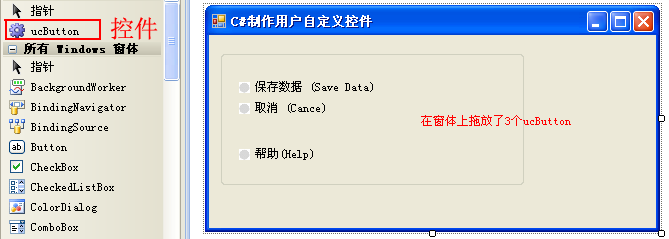
4. 按F5编译项目,建立一个测试窗体,在控件工具栏会看到有个齿轮图标的项目。
在窗体上拖3个ucButton。
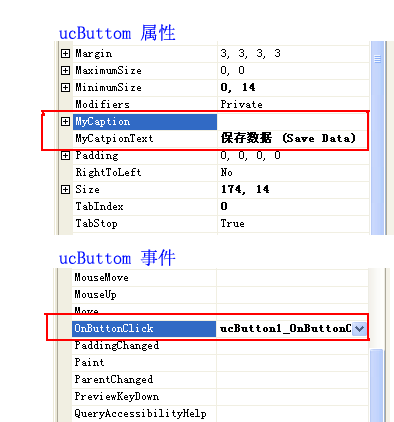
5.设置按钮标题及事件。
6.运行程序
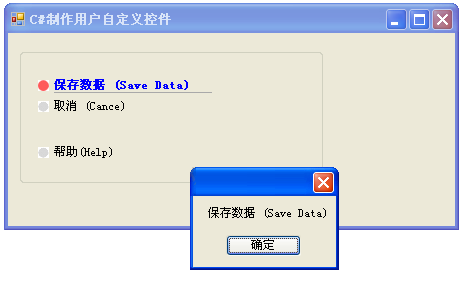
Source Code:

参考文档:
FastReport.NET自动文本宽度+自动换行+自动行高|C/S开发框架
FastReport.NET2023破解版去除水印DEMO VERSION (2025.1.14/2023.2.18版本)|C/S开发框架
C/S软件授权注册系统V3.0(Winform+WebApi+.NET8+EFCore版本)|C/S开发框架
.NET C/S架构软件用户授权设计方案(mac地址+白名单用户)|C/S开发框架
企业级C/S系统快速开发框架(Winform+.NET8+EFCore)|C/S开发框架
.NETCore WebApi运行报错:System.AggregateException:“Some services are not able to be constructed|C/S开发框架
C#.NET各版本常用语法糖大全(C#3~C#10)|C/S开发框架
CSFramework.EF数据库框架应用Schema测试多种数据库(.NET8+EFCore)|C/S开发框架
CSFrameworV6试用版开发指南 | 主程序初始化CSFramework.EF数据库框架(.NET8)|C/S开发框架
.NET Reactor(.NET混淆器)加壳软件使用|C/S开发框架
CSFramework开发框架使用.NET Reactor加壳软件导致多语言失效|C/S开发框架
.NETCore WebApi后端开发框架+达梦数据库测试报告|C/S开发框架
C#.NET调用达梦数据库的存储过程返回多张表|C/S开发框架
C#.NET 达梦数据库存储过程 获取OUT参数返回值|C/S开发框架
SqlServer数据类型、DbType类型、.NET类型与达梦数据类型关系表|C/S开发框架
.NET8 .NETCore运行环境下载|C/S开发框架
FastReport.NET自动文本宽度+自动换行+自动行高|C/S开发框架
FastReport.NET2023破解版去除水印DEMO VERSION (2025.1.14/2023.2.18版本)|C/S开发框架
C/S软件授权注册系统V3.0(Winform+WebApi+.NET8+EFCore版本)|C/S开发框架
.NET C/S架构软件用户授权设计方案(mac地址+白名单用户)|C/S开发框架
企业级C/S系统快速开发框架(Winform+.NET8+EFCore)|C/S开发框架
.NETCore WebApi运行报错:System.AggregateException:“Some services are not able to be constructed|C/S开发框架
C#.NET各版本常用语法糖大全(C#3~C#10)|C/S开发框架
CSFramework.EF数据库框架应用Schema测试多种数据库(.NET8+EFCore)|C/S开发框架
CSFrameworV6试用版开发指南 | 主程序初始化CSFramework.EF数据库框架(.NET8)|C/S开发框架
.NET Reactor(.NET混淆器)加壳软件使用|C/S开发框架
CSFramework开发框架使用.NET Reactor加壳软件导致多语言失效|C/S开发框架
.NETCore WebApi后端开发框架+达梦数据库测试报告|C/S开发框架
C#.NET调用达梦数据库的存储过程返回多张表|C/S开发框架
C#.NET 达梦数据库存储过程 获取OUT参数返回值|C/S开发框架
SqlServer数据类型、DbType类型、.NET类型与达梦数据类型关系表|C/S开发框架
.NET8 .NETCore运行环境下载|C/S开发框架
其它资料:
什么是C/S结构? | C/S框架核心组成部分 | C/S框架-WebService部署图 | C/S框架-权限管理 | C/S结构系统框架 - 5.1旗舰版介绍 | C/S结构系统框架 - 功能介绍 | C/S结构系统框架 - 产品列表 | C/S结构系统框架 - 应用展示(图) | 三层体系架构详解 | C/S架构轻量级快速开发框架 | C/S框架网客户案例 | WebApi快速开发框架 | C/S框架代码生成器 | 用户授权注册软件系统 | 版本自动升级软件 | 数据库底层应用框架 | CSFramework.CMS内容管理系统 |
什么是C/S结构? | C/S框架核心组成部分 | C/S框架-WebService部署图 | C/S框架-权限管理 | C/S结构系统框架 - 5.1旗舰版介绍 | C/S结构系统框架 - 功能介绍 | C/S结构系统框架 - 产品列表 | C/S结构系统框架 - 应用展示(图) | 三层体系架构详解 | C/S架构轻量级快速开发框架 | C/S框架网客户案例 | WebApi快速开发框架 | C/S框架代码生成器 | 用户授权注册软件系统 | 版本自动升级软件 | 数据库底层应用框架 | CSFramework.CMS内容管理系统 |