 在线客服
在线客服



C#实现SQL查询分析器(C# Visual SQL Query Designer)
Introduction
This article describes the implementation of a QueryDesignerDialog class that allows users to create SQL queries based on a given OLEDB connection string.
The designer is similar to the ones found in database tools such as the SQL Server Management Studio and Microsoft Access. It allows end users to build SQL queries with support for sorting, grouping, and filtering.
The main limitation of the QueryDesignerDialog is that it does not parse existing SQL statements. This is a one-way tool; you can use it to create new queries, but not to edit existing ones. Also, it only supports OLEDB data sources, which includes SQL Server and Access. Future versions may address these limitations.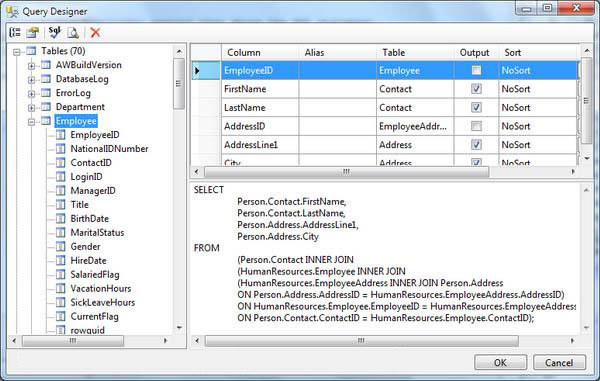
介绍
本文描述了QueryDesignerDialog类的实现, 通过OLEDB连接服务器后允许用户创建SQL查询语句.
该工具类似SQL Server Management Studio和Microsoft Access中的设计器. 甚至允许用户建立支持排序,分组和过滤的SQL语句.
QueryDesignerDialog是一个单向的工具, 主要限制是该类不能分析现有的SQL语句。 可以创建新的SQL查询但不能修改现有的SQL查询。
另外,它仅支持通过OLEDB连接的SQL Server和Access数据库.将来的版本会解决这些问题.
Background
The first version of the QueryDesignerDialog was written for use with a Report Designer application. I could not find a tool (free or commercial) to do the job the way I wanted, so I decided to write it myself. After that, I re-used it in a few other applications, and thought it might be useful to others as well.
背景
QueryDesignerDialog的第一个版本是为报表设计器应用程序(Report Designer application)开发的。我找不到一个能实现上述功能的工具(免费或商业化).
所以我决定自己开发,在此之后,该工具在其它程序中也有些应用,我希望它能帮助一些人.
Using the Code
The QueryDesignerDialog has two main properties:
ConnectionString: Gets or sets the OLEDB connection string used to retrieve the database schema with the list of tables, views, fields, and relations from which the query will be built.SelectStatement: Gets the SQL statement designed by the user. For now, this is a read-only property. The dialog cannot be used to edit existing SQL statements. Perhaps this will be added in future versions.
The code snippet below shows how the QueryDesignerDialog is typically used. You assign it a connection string, show the dialog, and read back the SQL query:
使用方法
QueryDesignerDialog 有两个主要属性:
ConnectionString: 获取或设置OLEDB连接字符串,通过建立的SQL用来检索的表,视图,字段,关联的数据结构.
SelectStatement: 获取或设置用户输入的SQL语句,目前是只读属性,暂不能修改数据库中现有的SQL语句,也许将来的版本会实现此功能。
下面的代码片段展示QueryDesignerDialog典型应用。只需分配一个连接字符串然并显示对话框,然后读取你输入的SQL:
代码:
// create the QueryDesignerDialog
using (var dlg = new QueryDesignerDialog())
{
// set the connection string
dlg.ConnectionString = ConnectionString;
// show the dialog
if (dlg.ShowDialog(this) == DialogResult.OK)
{
// get the new Sql query and do something with it
string newSql = dlg.SelectStatement;
DoSomething(newSql);
}
}
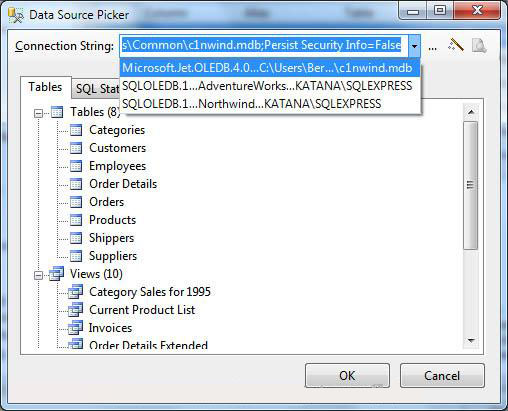
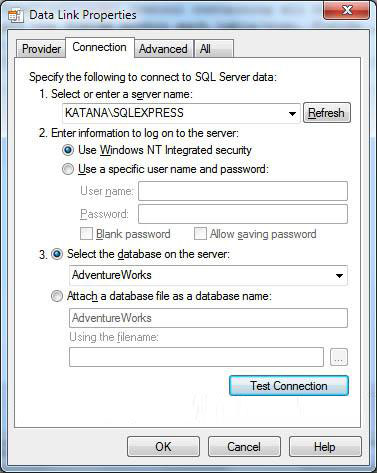
This code invokes the "DataLink" dialog seen below:
打开"DataLink"对话框
// pick a new connection
void _btnConnPicker_Click(object sender, EventArgs e)
{
// release mouse capture to avoid wait cursor
_toolStrip.Capture = false;
// get starting connection string
// (if empty or no provider, start with SQL source as default)
string connString = _cmbConnString.Text;
if (string.IsNullOrEmpty(connString) ||
connString.IndexOf("provider=", StringComparison.OrdinalIgnoreCase) < 0)
{
connString = "Provider=SQLOLEDB.1;";
}
// let user change it
ConnectionString = OleDbConnString.EditConnectionString(this, connString);
}
www.csframework.com 翻译 原文转自codeproject,转载请注明出处.
原文:http://www.codeproject.com/KB/database/QueryDesigner.aspx

[下载]超好用高效率SQL客户端查询分析器(sqldbx)
With语法实现SQL树结构数据查询(转)
Winform调用WebApi接口实现增删改查CRUD实例源码
CSFrameworkV6 | 软件用户数授权 | 通过控制在线用户数实现逻辑|C/S开发框架
EntityFramework通用DbContext类,支持动态实体模型,多数据库(MySQL,SqlServer,Oracle)
C# Win服务定时作业实现集团之间的跨系统跨数据库数据同步|C/S开发框架
Winform企业级WCF快速开发框架平台(C/S架构+WCF+DevExpress+SQL多数据库)
CSFramework对象模型框架(DbDataUpdate),支持MsSQL,MySQL,Oracle三种数据库操作
C/S架构多语言界面UI框架软件开发框架(C#.NET+Winform+DEV+SQL)
原创C/S架构开源软件 - C#.NET+Winform+Dev+SQL快速开发框架
CSFramework通用自动提交数据工具类(DbDataUpdate),支持MsSQL,MySQL,Oracle三种数据库
ASP.NET WebApi框架异步实现MultipartContent方式上传文件
基于Web前端用户调用CSFramework.WebApi服务端登录登出接口实现
CSFramework.WebApi令牌管理器(Token Provider)实现添加、删除、刷新令牌过期控制
CSFramework.WebApi时钟定时作业异步处理程序(IThreadHandler接口)实现
CSFramework.DB基于ADO.NET多数据库底层组件包(MSSQL+Oracle+MySQL)
什么是C/S结构? | C/S框架核心组成部分 | C/S框架-WebService部署图 | C/S框架-权限管理 | C/S结构系统框架 - 5.1旗舰版介绍 | C/S结构系统框架 - 功能介绍 | C/S结构系统框架 - 产品列表 | C/S结构系统框架 - 应用展示(图) | 三层体系架构详解 | C/S架构轻量级快速开发框架 | C/S框架网客户案例 | WebApi快速开发框架 | C/S框架代码生成器 | 用户授权注册软件系统 | 版本自动升级软件 | 数据库底层应用框架 | CSFramework.CMS内容管理系统 |